
5.3 筛选器/拦截器/过滤器/AOP
5.3.1 关于筛选器
筛选器又名过滤器,拦截器,在 ASP.NET Core 中,可在请求处理管道中特定阶段之前或之后运行代码。筛选器是非常经典的面向切面编程方式,也就是所谓的 AOP 操作。
通俗点说就是可以在控制器 Action 执行前后进行切面操作或返回 Result 结果前后操作。
5.3.2 应用场景
通过自定义筛选器可以实现错误处理,缓存处理,授权处理,日志记录,实现工作单元事务(Uow)等等切面操作,从而使业务逻辑和系统行为逻辑进行分离。
5.3.2.1 筛选器优点
- 易拓展,易集成
- 业务和系统逻辑分离,不干扰业务代码
- 可实现接口多维度控制,如请求参数篡改,返回值篡改,限流,分布式事务支持
- ...
5.3.3 支持拦截应用
Mvc/WebAPI控制器/ActionRazor Pages页面- 框架提供的
动态 WebAPI - 所有请求资源
- 全局异常
5.3.4 筛选器类型
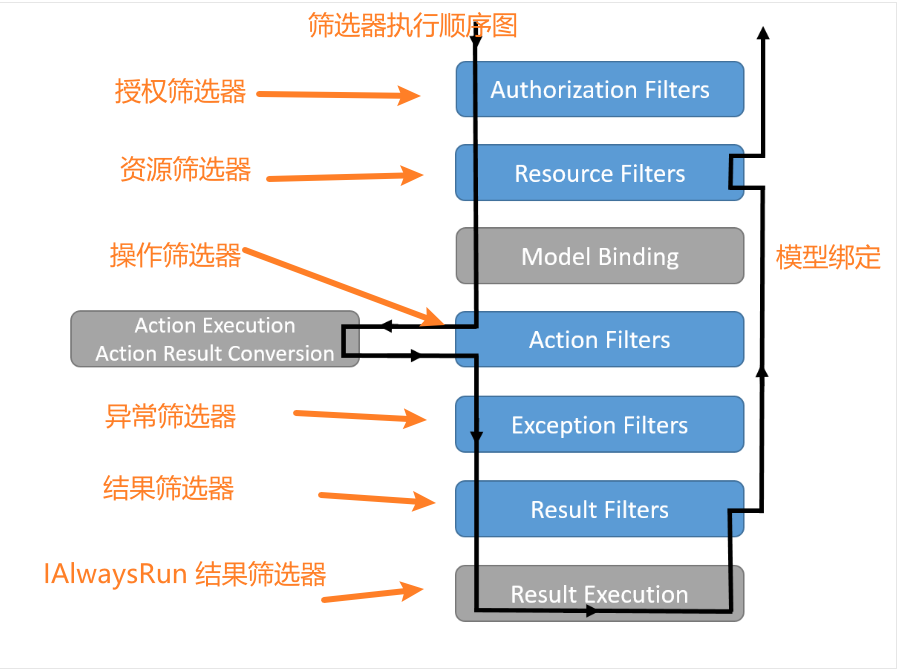
5.3.4.1 接口类型
- 授权筛选器:该筛选器是最先运行,用于确定是否已针对请求为用户授权。 如果请求未获授权,授权筛选器可以让管道短路。
IAuthorizationFilterIAsyncAuthorizationFilterAuthorizeFilter
- 资源筛选器:授权后运行,如果需要是大部分请求管道短路,它将会很有用
IResourceFilterIAsyncResourceFilter
- 操作筛选器:在调用操作方法之前和之后运行代码,可以更改传递的参数,返回结果等,不可在
Razor Pages中使用。IActionFilterIAsyncActionFilter
- 异常筛选器:在向响应正文写入任何内容之前,对未经处理的异常应用全局策略。
IExceptionFilterIAsyncExceptionFilter
- 结果筛选器:在执行操作结果之前和之后立即运行代码,仅当操作方法成功执行时,它们才会运行。 对于必须围绕视图或格式化程序的执行的逻辑,它们很有用。
IResultFilterIAsyncResultFilterIAlwaysRunResultFilter:该接口主要针对所有操作结果运行拦截,也就是即使IResourceFilter设置了Result仍会执行并获取最终的ResultIAsyncAlwaysRunResultFilter
- Razor Pages 筛选器:允许
Razor Pages在运行Razor页面处理程序前后运行代码,和操作筛选器类似,但它们不能应用单个页面处理程序方法。IPageFilterIAsyncPageFilter
5.3.4.2 特性 Attribute 类型
- 授权特性筛选器 (
Attribute+IAsyncAuthorizationFilter):同上接口类型 - 操作特性筛选器 (
ActionFilterAttribute):同上接口类型 - 异常特性筛选器 (
ExceptionFilterAttribute):同上接口类型 - 结果特性筛选器 (
ResultFilterAttribute):同上接口类型 - 服务特性筛选器 (
ServiceFilterAttribute):支持依赖注入的服务筛选器特性 - 类型特性筛选器 (
TypeFilterAttribute):不支持依赖注入但可以传入自定义构造函数参数 - 组合特性筛选器 (
Attribute+ 接口类型方式):可以通过派生自Attribute和 特定接口实现,如Attribute, IActionFilter
关于选择哪种类型的筛选器有一个小技巧,当你不需要全局筛选器的时候使用特性筛选器,否则使用接口类型筛选器。
另外尽可能的使用带 IAsync 开头的异步筛选器,这样无需分开多个方法,可在一个方法中操作,还能提高吞吐量。
筛选器接口的同步和异步版本任意实现一个,而不是同时实现。
运行时会先查看筛选器是否实现了异步接口,如果是,则调用该接口。 如果不是,则调用同步接口的方法。
如果在一个类中同时实现异步和同步接口,则仅调用异步方法。 使用抽象类(如 ActionFilterAttribute)时,将为每种筛选器类型仅重写同步方法或仅重写异步方法。
5.3.5 筛选器注册
ASP.NET Core 提供了多种筛选器注册方式,通常情况下不同的注册方式执行顺序不同,服务类型注册最先执行,其次是 Mvc Filter 方式,最后是特性方式。相同的方式中又按照注册前后来决定执行顺序,先注册先执行。
同时也提供了 IOrderedFilter 接口重写执行顺序,其 Order 属性值越高的先执行。
5.3.5.1 在 Startup.cs 中注册
最常见的注册筛选器的方式就是在 Startup.cs 中注册,这种方式表示全局注册,应用所有控制器/Action
public void ConfigureServices(IServiceCollection services)
{
    // Mvc 方式注册一,全局执行
    services.AddControllersWithViews(options =>
    {
       options.Filters.Add(new AddHeaderAttribute("GlobalAddHeader", "Result filter added to MvcOptions.Filters"));     // 手动创建实例,带构造参数
       options.Filters.Add(typeof(MySampleActionFilter));   // 类型 Type 方式
       options.Filters.Add(new SampleGlobalActionFilter()); // 手动创建实例,无构造参数
    });

    // Mvc 方式注册二,全局执行
    services.Configure<MvcOptions>(options =>
    {
        options.Filters.Add<TFilter>();
    });

    // Mvc 注册方式三,全局执行,Furion 框架提供方式
    services.AddMvcFilter<TFilter>();
}
5.3.5.2 特性方式注册
如果筛选器派生自 特性,则可通过特性方式注册,这种方式表示局部注册,只作用于特定的控制器/Action
- 直接贴方式
// 定义结果特性筛选器
public class AddHeaderAttribute : ResultFilterAttribute
{
    // ...
}

// 直接贴方式,对于动态 WebAPI 也是一样的
[AddHeader]
public class SampleController : Controller
{
}
- 通过
[ServiceFilter]方式
这种方式适用于自定义的特性筛选器包含构造函数注入服务应用场景,这种方式必须在 ConfigureService 中通过 services.AddScoped<TFilter> 注册。
public class MyActionFilterAttribute : ActionFilterAttribute
{
    // 注入服务
    private readonly PositionOptions _settings;
    public MyActionFilterAttribute(IOptions<PositionOptions> options)
    {
    }
}
需先在 Startup.cs 中注册筛选器
services.AddScoped<MyActionFilterAttribute>();
使用:
public class SampleController : Controller
{
    // 通过 [ServiceFilter] 方式
    [ServiceFilter(typeof(MyActionFilterAttribute))]
    public IActionResult Index2()
    {
        // ...
    }
}
- 通过
[TypeFilter]方式
[TypeFilter] 和 [ServiceFilter] 类似,唯一的区别就是 [TypeFilter] 不支持构造函数注入服务,但可以传递基元类型构造函数参数。
public class MyLogFilterAttribute : ActionFilterAttribute
{
    // 构造函数包含基元类型参数
    public MyLogFilterAttribute(string message, int level)
    {
    }
}

public class SampleController : Controller
{
    // 通过 [TypeFilter] 方式
    [TypeFilter(typeof(MyLogFilterAttribute), Arguments = new object[] { "Message", 10 })]
    public IActionResult Index2()
    {
        // ...
    }
}
5.3.6 授权筛选器
通过授权筛选器可以实现在所有请求到达控制器/Action 之前进行验证,如果授权失败,直接跳转到登录或者返回 401。
5.3.6.1 接口定义方式
using Microsoft.AspNetCore.Authorization;
using Microsoft.AspNetCore.Mvc;
using Microsoft.AspNetCore.Mvc.Authorization;
using Microsoft.AspNetCore.Mvc.Controllers;
using Microsoft.AspNetCore.Mvc.Filters;

namespace WebApplication4.Filters;

/// <summary>
/// 自定义授权筛选器
/// </summary>
public class MyAuthorizationFilter : IAsyncAuthorizationFilter
{
    public async Task OnAuthorizationAsync(AuthorizationFilterContext context)
    {
        Console.WriteLine("授权检查......");

        // 获取控制器信息
        var actionDescriptor = context.ActionDescriptor as ControllerActionDescriptor;

        // 获取控制器类型
        var controllerType = actionDescriptor!.ControllerTypeInfo;

        // 获取 Action 类型
        var methodType = actionDescriptor.MethodInfo;

        // 是否匿名访问
        var allowAnonymouse = context.Filters.Any(u => u is IAllowAnonymousFilter)
                        || controllerType.IsDefined(typeof(AllowAnonymousAttribute), true)
                        || methodType.IsDefined(typeof(AllowAnonymousAttribute), true);

        // 不是匿名才处理权限检查
        if (!allowAnonymouse)
        {
            Console.Write("逻辑检查~~~~");

            // 在 MVC 项目中,如果检查失败,则跳转到登录页
            if (typeof(Controller).IsAssignableFrom(controllerType.AsType()))
            {
                context.Result = new RedirectResult("~/Login");
            }
            // WebAPI 或者其他类型
            else
            {
                // 返回未授权
                context.Result = new UnauthorizedResult();
            }
        }
        // 否则直接跳过处理
        else await Task.CompletedTask;
    }
}
全局注册
在 ConfigureService 中注册,该方式会作用所有的控制器/ Action:
services.Configure<MvcOptions>(options =>
{
    options.Filters.Add<MyAuthorizationFilter>();
});
Furion 框架中提供了 services.AddMvcFilter<MyAuthorizationFilter>(),可使用它代替上面多行注册。
局部特性方式
[TypeFilter]:
[TypeFilter(typeof(MyAuthorizationFilter))]
public IActionResult Get()
{
    // ...
}
[ServiceFilter]
services.AddScoped<MyAuthorizationFilter>();
[ServiceFilter(typeof(MyAuthorizationFilter))]
public IActionResult Get()
{
    // ...
}
5.3.6.2 特性定义方式(组合)
只需要上述接口方式中添加派生 Attribute 并设置 [AttributeUsage] 接口,如:
[AttributeUsage(AttributeTargets.Method | AttributeTargets.Class, Inherited=true, AllowMultiple=false)]
public class MyAuthorizationFilterAttribute : Attribute, IAsyncAuthorizationFilter
{
    public async Task OnAuthorizationAsync(AuthorizationFilterContext context)
    {
        // 代码同上
    }
}
使用:
[MyAuthorizationFilter]
public IActionResult Get()
{
    // ...
}
5.3.7 资源筛选器
资源筛选器使用频率较少,通常用来处理资源缓存或者阻止模型(值)绑定操作。
5.3.7.1 接口定义方式
using Microsoft.AspNetCore.Mvc.Filters;
using Microsoft.AspNetCore.Mvc.ModelBinding;

namespace WebApplication4.Filters;

public class MyResourceFilter : IAsyncResourceFilter
{
    public async Task OnResourceExecutionAsync(ResourceExecutingContext context, ResourceExecutionDelegate next)
    {
        // 获取所有资源提供器工厂
        var valueProviderFactories = context.ValueProviderFactories;

        // 比如这里判断如果是 Form 表单方式提交就就不给参数复制
        var formValueProviderFactory = valueProviderFactories
                .OfType<FormValueProviderFactory>()
                .FirstOrDefault();
        if (formValueProviderFactory != null)
        {
            // 移除 Form 表单绑定值提供器器
            context.ValueProviderFactories.Remove(formValueProviderFactory);
        }

        // .... 更多操作

        // 资源请求成功后
        var resourceContext = await next();
    }
}
全局注册
在 ConfigureService 中注册,该方式会作用所有的控制器/ Action:
services.Configure<MvcOptions>(options =>
{
    options.Filters.Add<MyResourceFilter>();
});
Furion 框架中提供了 services.AddMvcFilter<MyResourceFilter>(),可使用它代替上面多行注册。
局部特性方式
[TypeFilter]:
[TypeFilter(typeof(MyResourceFilter))]
public IActionResult Get()
{
    // ...
}
[ServiceFilter]
services.AddScoped<MyResourceFilter>();
[ServiceFilter(typeof(MyResourceFilter))]
public IActionResult Get()
{
    // ...
}
5.3.7.2 特性定义方式(组合)
只需要上述接口方式中添加派生 Attribute 并设置 [AttributeUsage] 接口,如:
[AttributeUsage(AttributeTargets.Method | AttributeTargets.Class, Inherited=true, AllowMultiple=false)]
public class MyResourceFilterAttribute : Attribute, IAsyncResourceFilter
{
    public async Task OnResourceExecutionAsync(ResourceExecutingContext context, ResourceExecutionDelegate next)
    {
        // 代码同上
    }
}
使用:
[MyResourceFilter]
public IActionResult Get()
{
    // ...
}
5.3.8 操作筛选器
操作筛选器是使用频率最高的筛选器,通常用来控制进入 Action 之前(此时模型绑定已经完成)和 Action 执行之后(此时 Result 还未返回)。
可以使用操作筛选器实现各种骚操作,如篡改参数,篡改返回值,统一参数验证,审计日志,实现数据库事务自动开启关闭等等。
5.3.8.1 接口定义方式
using Microsoft.AspNetCore.Mvc.Controllers;
using Microsoft.AspNetCore.Mvc.Filters;
using System.Diagnostics;
using System.Security.Claims;

namespace WebApplication4.Filters;

public class MyActionFilter : IAsyncActionFilter
{
    public async Task OnActionExecutionAsync(ActionExecutingContext context, ActionExecutionDelegate next)
    {
        //============== 这里是执行方法之前获取数据 ====================
        // 获取控制器、路由信息
        var actionDescriptor = context.ActionDescriptor as ControllerActionDescriptor;

        // 获取请求的方法
        var method = actionDescriptor!.MethodInfo;

        // 获取 HttpContext 和 HttpRequest 对象
        var httpContext = context.HttpContext;
        var httpRequest = httpContext.Request;

        // 获取客户端 Ipv4 地址
        var remoteIPv4 = httpContext.GetRemoteIpAddressToIPv4();

        // 获取请求的 Url 地址
        var requestUrl = httpRequest.GetRequestUrlAddress();

        // 获取来源 Url 地址
        var refererUrl = httpRequest.GetRefererUrlAddress();

        // 获取请求参数(写入日志,需序列化成字符串后存储),可以自由篡改!!!!!!
        var parameters = context.ActionArguments;

        // 获取操作人(必须授权访问才有值)"userId" 为你存储的 claims type,jwt 授权对应的是 payload 中存储的键名
        var userId = httpContext.User?.FindFirstValue("userId");

        // 请求时间
        var requestedTime = DateTimeOffset.Now;

        //============== 这里是执行方法之后获取数据 ====================
        var actionContext = await next();

        // 获取返回的结果
        var returnResult = actionContext.Result;

        // 判断是否请求成功,没有异常就是请求成功
        var isRequestSucceed = actionContext.Exception == null;

        // 获取调用堆栈信息,提供更加简单明了的调用和异常堆栈
        var stackTrace = EnhancedStackTrace.Current();

        // 其他操作,如写入日志
    }
}
全局注册
在 ConfigureService 中注册,该方式会作用所有的控制器/ Action:
services.Configure<MvcOptions>(options =>
{
    options.Filters.Add<MyActionFilter>();
});
Furion 框架中提供了 services.AddMvcFilter<MyActionFilter>(),可使用它代替上面多行注册。
局部特性方式
[TypeFilter]:
[TypeFilter(typeof(MyActionFilter))]
public IActionResult Get()
{
    // ...
}
[ServiceFilter]
services.AddScoped<MyActionFilter>();
[ServiceFilter(typeof(MyActionFilter))]
public IActionResult Get()
{
    // ...
}
5.3.8.2 ActionFilterAttribute 方式
using Microsoft.AspNetCore.Mvc.Filters;

namespace WebApplication4.Filters;

public class MyActionAttribute : ActionFilterAttribute
{
    /// <summary>
    /// 执行操作前后
    /// </summary>
    /// <param name="context"></param>
    /// <param name="next"></param>
    /// <returns></returns>
    public override Task OnActionExecutionAsync(ActionExecutingContext context, ActionExecutionDelegate next)
    {
        // 代码参考接口方式

        return base.OnActionExecutionAsync(context, next);
    }

    /// <summary>
    /// 返回结果前后
    /// </summary>
    /// <param name="context"></param>
    /// <param name="next"></param>
    /// <returns></returns>
    public override Task OnResultExecutionAsync(ResultExecutingContext context, ResultExecutionDelegate next)
    {
        // 代码参考接口方式

        return base.OnResultExecutionAsync(context, next);
    }
}
全局注册
在 ConfigureService 中注册,该方式会作用所有的控制器/ Action:
services.Configure<MvcOptions>(options =>
{
    options.Filters.Add<MyActionAttribute>();
});
Furion 框架中提供了 services.AddMvcFilter<MyActionAttribute>(),可使用它代替上面多行注册。
局部特性方式
[MyAction]
public IActionResult Get()
{
    // ...
}
5.3.8.3 特性定义方式(组合)
只需要上述接口方式中添加派生 Attribute 并设置 [AttributeUsage] 接口,如:
[AttributeUsage(AttributeTargets.Method | AttributeTargets.Class, Inherited=true, AllowMultiple=false)]
public class MyActionFilterAttribute : Attribute, IAsyncActionFilter
{
    public async Task OnActionExecutionAsync(ActionExecutingContext context, ActionExecutionDelegate next)
    {
        // 代码同上
    }
}
使用:
[MyActionFilter]
public IActionResult Get()
{
    // ...
}
5.3.9 异常筛选器
异常筛选器使用频率仅次于操作筛选器,更多用于程序出现异常时记录日志或者返回统一的页面操作。
5.3.9.1 接口定义方式
using Microsoft.AspNetCore.Mvc.Controllers;
using Microsoft.AspNetCore.Mvc.Filters;
using System.Diagnostics;

namespace WebApplication4.Filters;

public class MyExceptionFilter : IAsyncExceptionFilter
{
    public async Task OnExceptionAsync(ExceptionContext context)
    {
        // 如果异常在其他地方被标记了处理,那么这里不再处理
        if (context.ExceptionHandled) return;

        // 获取控制器信息
        ControllerActionDescriptor? actionDescriptor = context.ActionDescriptor as ControllerActionDescriptor;

        // 获取请求的方法
        var method = actionDescriptor!.MethodInfo;

        // 获取异常对象
        var exception = context.Exception;

        // 获取调用堆栈信息,提供更加简单明了的调用和异常堆栈
        var stackTrace = EnhancedStackTrace.Current();

        // 其他处理~~~
        // 1. MVC 直接返回自定义的错误页面,或者 BadPageResult 类型,如:context.Result = new BadPageResult(StatusCodes.Status500InternalServerError) { }

        // 2. WebAPI 可以直接返回 context.Result = new JsonResult(.....);

        // 3. 记录日志。。。。

        await Task.CompletedTask;
    }
}
全局注册
在 ConfigureService 中注册,该方式会作用所有的控制器/ Action:
services.Configure<MvcOptions>(options =>
{
    options.Filters.Add<MyExceptionFilter>();
});
Furion 框架中提供了 services.AddMvcFilter<MyExceptionFilter>(),可使用它代替上面多行注册。
局部特性方式
[TypeFilter]:
[TypeFilter(typeof(MyExceptionFilter))]
public IActionResult Get()
{
    // ...
}
[ServiceFilter]
services.AddScoped<MyExceptionFilter>();
[ServiceFilter(typeof(MyExceptionFilter))]
public IActionResult Get()
{
    // ...
}
5.3.9.2 ExceptionFilterAttribute 方式
using Microsoft.AspNetCore.Mvc.Filters;

namespace WebApplication4.Filters;

public class MyExceptionAttribute : ExceptionFilterAttribute
{
    /// <summary>
    /// 异常拦截器
    /// </summary>
    /// <param name="context"></param>
    /// <returns></returns>
    public override Task OnExceptionAsync(ExceptionContext context)
    {
        // 代码参考接口方式
        return base.OnExceptionAsync(context);
    }
}
全局注册
在 ConfigureService 中注册,该方式会作用所有的控制器/ Action:
services.Configure<MvcOptions>(options =>
{
    options.Filters.Add<MyExceptionAttribute>();
});
Furion 框架中提供了 services.AddMvcFilter<MyExceptionAttribute>(),可使用它代替上面多行注册。
局部特性方式
[MyException]
public IActionResult Get()
{
    // ...
}
5.3.9.3 特性定义方式(组合)
只需要上述接口方式中添加派生 Attribute 并设置 [AttributeUsage] 接口,如:
[AttributeUsage(AttributeTargets.Method | AttributeTargets.Class, Inherited=true, AllowMultiple=false)]
public class MyExceptionFilterAttribute : Attribute, IAsyncExceptionFilter
{
    public async Task OnExceptionAsync(ExceptionContext context)
    {
        // 代码同上
    }
}
使用:
[MyExceptionFilter]
public IActionResult Get()
{
    // ...
}
5.3.10 结果筛选器
结果控制器常用于对返回的结果附加更多数据,比如 Mvc 中的 ViewBag,ViewData,换句话说主要用来控制输出到浏览器的界面视图对象。
5.3.10.1 接口定义方式
using Microsoft.AspNetCore.Mvc;
using Microsoft.AspNetCore.Mvc.Controllers;
using Microsoft.AspNetCore.Mvc.Filters;

namespace WebApplication4.Filters;

public class MyResultFilter : IAsyncResultFilter
{
    public async Task OnResultExecutionAsync(ResultExecutingContext context, ResultExecutionDelegate next)
    {
        // 获取控制器信息
        ControllerActionDescriptor? actionDescriptor = context.ActionDescriptor as ControllerActionDescriptor;

        // 获取路由表信息
        var routeData = context.RouteData;
        var controllerName = routeData.Values["controller"];
        var actionName = routeData.Values["action"];
        var areaName = routeData.DataTokens["area"];

        // 判断如果是 MVC 视图,可以动态添加数据到页面中
        if (context.Result is ViewResult viewResult)
        {
            // 动态添加数据,在 Razor 中就可以直接使用 @TempData["Name"] 获取数据了
            viewResult.TempData["Name"] = "Furion";

            // 动态添加数据,在 Razor 中就可以直接使用 @ViewBag.Version 或 @ViewData["Name"] 获取数据了
            viewResult.ViewData["Version"] = 1;
        }

        // 这里还可以强制性换掉 Result
        // context.Result = new ContentResult("....");

        // 执行下一个结果过滤器,如果直接短路返回,可设置 context.Cancel = true; 这样就不会执行下一个过滤器,这个和下列代码是互斥的
        var resultContext = await next();

        // 获取返回的结果
        var result = resultContext.Result;
    }
}
全局注册
在 ConfigureService 中注册,该方式会作用所有的控制器/ Action:
services.Configure<MvcOptions>(options =>
{
    options.Filters.Add<MyResultFilter>();
});
Furion 框架中提供了 services.AddMvcFilter<MyResultFilter>(),可使用它代替上面多行注册。
局部特性方式
[TypeFilter]:
[TypeFilter(typeof(MyResultFilter))]
public IActionResult Get()
{
    // ...
}
[ServiceFilter]
services.AddScoped<MyResultFilter>();
[ServiceFilter(typeof(MyResultFilter))]
public IActionResult Get()
{
    // ...
}
5.3.10.2 ResultFilterAttribute 方式
using Microsoft.AspNetCore.Mvc.Filters;

namespace WebApplication4.Filters;

public class MyResultAttribute : ResultFilterAttribute
{
    public override Task OnResultExecutionAsync(ResultExecutingContext context, ResultExecutionDelegate next)
    {
        // 代码参考接口方式

        return base.OnResultExecutionAsync(context, next);
    }
}
全局注册
在 ConfigureService 中注册,该方式会作用所有的控制器/ Action:
services.Configure<MvcOptions>(options =>
{
    options.Filters.Add<MyResultAttribute>();
});
Furion 框架中提供了 services.AddMvcFilter<MyResultAttribute>(),可使用它代替上面多行注册。
局部特性方式
[MyResult]
public IActionResult Get()
{
    // ...
}
5.3.10.3 特性定义方式(组合)
只需要上述接口方式中添加派生 Attribute 并设置 [AttributeUsage] 接口,如:
[AttributeUsage(AttributeTargets.Method | AttributeTargets.Class, Inherited=true, AllowMultiple=false)]
public class MyResultFilterAttribute : Attribute, IAsyncResultFilter
{
    public async Task OnResultExecutionAsync(ResultExecutingContext context, ResultExecutionDelegate next)
    {
        // 代码同上
    }
}
使用:
[MyResultFilter]
public IActionResult Get()
{
    // ...
}
5.3.10.4 IAlwaysRunResultFilter
IAlwaysRunResultFilter 和 IAsyncAlwaysRunResultFilter 接口声明了一个针对所有操作结果运行的 IResultFilter 实现。 这包括由以下对象生成的操作结果:
- 设置短路的授权筛选器和资源筛选器。
- 异常筛选器。
5.3.11 RazorPages 筛选器
Razor Pages 筛选器仅支持 Razor Pages 项目类型。
5.3.11.1 接口定义方式
using Microsoft.AspNetCore.Mvc.Filters;

namespace WebApplication1;

public class MyPageFilter : IAsyncPageFilter
{
    /// <summary>
    /// 调用方法之前
    /// </summary>
    /// <param name="context"></param>
    /// <param name="next"></param>
    /// <returns></returns>
    public async Task OnPageHandlerExecutionAsync(PageHandlerExecutingContext context, PageHandlerExecutionDelegate next)
    {
        // 路由信息
        var routeData = context.RouteData;

        // 请求方法信息
        var actionDescriptor = context.ActionDescriptor;

        // 处理方法信息
        var methodDescriptor = context.HandlerMethod;

        await next.Invoke();
    }

    /// <summary>
    /// 模型绑定之前
    /// </summary>
    /// <param name="context"></param>
    /// <returns></returns>
    public Task OnPageHandlerSelectionAsync(PageHandlerSelectedContext context)
    {
        return Task.CompletedTask;
    }
}
全局注册
在 ConfigureService 中注册,该方式会作用所有 Page Handler
services.Configure<MvcOptions>(options =>
{
    options.Filters.Add(new MyPageFilter());
});
5.3.11.2 ResultFilterAttribute 方式
using Microsoft.AspNetCore.Mvc.Filters;

namespace WebApplication1.Filters;

public class MyResultAttribute : ResultFilterAttribute
{
    public override Task OnResultExecutionAsync(ResultExecutingContext context, ResultExecutionDelegate next)
    {
        // 代码参考接口方式

        return base.OnResultExecutionAsync(context, next);
    }
}
局部特性方式
[MyResult]
public void OnGet()
{
    // ...
}
5.3.12 筛选器取消和短路
通常筛选器支持多个,正常情况下,只要调用 await next() 方法都会进去下一个筛选器,但如果通过 context.Result = new XXXResult() 之后,就可以使其短路,也就是不会再执行下一个筛选器。
但也有例外:
- 在
IResultFilter/IAsyncResultFilter结果筛选器中,则使用标记context.Cancel = true;设置短路。 - 在
IExceptionFilter/IAsyncExceptionFilter异常筛选器中,则使用标记context.ExceptionHandled = true;设置短路。
5.3.13 筛选器执行顺序控制
默认情况下,筛选器是按照以下执行顺序执行:
5.3.13.1 不同类型筛选器执行顺序
IAuthorizationFilter -> IResourceFilter -> IActionFilter -> IExceptionFilter -> IResultFilter -> IAlwaysRunResultFilter
异步也是如此。
5.3.13.2 相同类型筛选器执行顺序
默认情况下,通过 services.Configure<MvcOptions>(...) 方式先注册先执行,之后到特性方式,也是采用先注册先执行。
如果使用同一种方式,如 services.Configuration<MvcOptions>(...) 或同一种特性方式,也可以控制其执行顺序,如:
IOrderedFilter方式:
public class MyActionFilter : IAsyncActionFilter, IOrderedFilter
{
    // 值越大,越优先执行
    public int Order => 1000;

    public async Task OnActionExecutionAsync(ActionExecutingContext context, ActionExecutionDelegate next)
    {
        // ....
    }
}
特性方式:
[MyActionFilter(Order = 1000)]
public class ControllerFiltersController : Controller
{
    // ...
}
5.3.14 筛选器依赖注入
筛选器是支持构造函数依赖注入服务的,使用它们的前提是在 Startup.cs 中注册,如:
services.AddScoped<MyActionFilterAttribute>();
5.3.15 了解更多
想了解更多筛选器知识可查阅官方文档 https://docs.microsoft.com/zh-cn/aspnet/core/mvc/controllers/filters?view=aspnetcore-6.0
5.3.16 反馈与建议
给 Furion 提 Issue。